
ADA Compliance
At Modsnap Design we offer professional ADA Compliance services for small and mid-size businesses.
What is Web Accessibility?
Access to the web has become inextricably linked to most parts of our lives and is crucial for participation in modern society. So, why aren’t we building websites that are accessible to everyone?
According to the CDC, 1 in 4 adults (26%) in the U.S. have a disability. In 2020, the World Bank reported roughly one billion people (15%) living with disabilities worldwide. These are huge numbers! Types of disabilities are complex and wide-ranging, but with the Internet, we have the ability to cater to everyone. This is where website accessibility comes in
In 2010, the U.S. Department of Justice passed the Americans with Disabilities Act Standards for Accessible Design, mandating all electronic and information technology, like websites, be accessible.
In order to make your website ADA-compliant, we use a number of techniques in addition to software by AccessiBe to adhere to these guidelines. The software was developed side by side by people with disabilities and leading experts in accessibility and assistive technology. It is an affordable option for making your website ADA-compliant, which will open you up to more customers and ward off unnecessary lawsuits.
What are the ADA standards for the web?
Web accessibility or ADA Compliance is a set of rules, behaviors, code standards, and design guidelines, that were created by the W3C and are called the WCAG..This stands for Web Content Accessibility Guidelines. If followed, they allow people with disabilities to effectively use your website.
The WCAG 2.1 outlines the most recent specific recommendations and techniques for ensuring that websites are accessible in every way. These guidelines are organized into three levels of conformance: A, AA, and AAA
By following the WCAG guidelines, businesses can ensure that their websites are accessible to all users, regardless of their abilities. This can improve the overall usability and accessibility of the website, and ensure that it is available to the widest possible audience.
How To Make Your Site Accessible
Having an accessible website benefits people with disabilities, and helps your business. Accessible websites can improve your search engine ranking, increase website traffic, and broaden your customer base.
ALT Tag Images
Alt (alternative) Text describes an image on a webpage, and is used by both screen readers and search engines.
Keyboard Accessibility
Users should be able to navigate your site without the use of a mous
Use Headings To Organize Your Content
Headings should create an outline format for the content of each page or post.
Check Colors And Contrast
With over 2.2 billion people affected by a visual impairment, failing to design with accessible colors in mind is one costly, exclusionary mistake to make.
Install Accessibility Plugins or Widgets
These overlay your website and allow the user to make changes to the site design (and more) in order to make it more accessible.
Get Started with ADA Compliance
Your ADA Compliance plan from Modsnap Design is based on your website size and needs. We start all accessibility campaigns with a audit of your existing site.
Start With an Audit
Before we can create your customized plan, we need to know more about your business. Fill out the form and we will be in touch shortly with your ADA Audit and next steps.
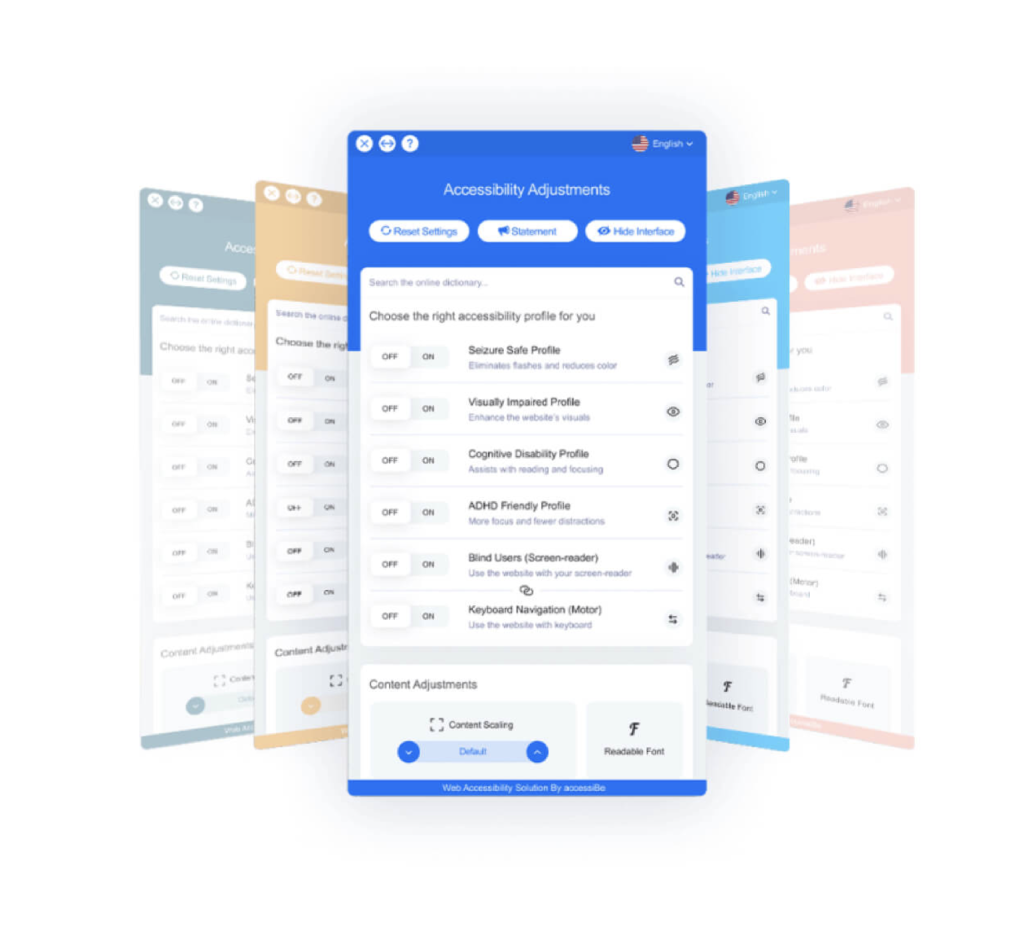
Accessibility Plugin Interface Capabilities:
The interface is designed to address accessibility requirements relating to the UI, design, and readability of your website. Users can choose a disability profile like “Visually Impaired Profile” and simultaneously activate all relevant adjustments. Alternatively, or in addition to the profiles, users can enable singular adjustments like increasing font sizes, changing color contrasts, and stopping animations. These changes will only affect how that individual user experiences your site.
-
Font Handling
Users can increase and decrease font size, change type, adjust spacing, alignment, line height, and more.
-
Color Handling
Users can select various color contrast profiles such as light, dark, inverted, and monochrome. Additionally, users can swap color schemes of titles, texts, and backgrounds, with over 7 different colors.
-
Audio Muting
Users with hearing devices may experience headaches or other issues due to automatic audio playing. This option allows users to mute the entire website instantly.
-
Other Options
Users can change the cursor’s color and sizing, view in printing mode, enable a virtual keyboard, and much more.
-
Animations
Users with epilepsy can stop all running animations at the click of a button. This includes videos, GIFs and CSS flashing transitions.
-
Content Highlighting
Users can emphasize important elements, such as links and titles. They can also highlight particular focused or hovered elements.
-
On-demand Dictionary
We utilize a search engine that is linked to Wikipedia and Wiktionary, allowing people with cognitive disorders to decipher meanings of phrases, initials, and slang on the spot.
Please Note:
When needed, we use AccessiBe to add additional compliance levels to your website. However, it will not change a thing for the majority of users.
It will only be activated when turned on via the interface (or a Screen-reader if the user is blind), as an overlay to your website, and only for the user’s specific session.
Therefore, AccessiBe won’t affect your design, UI, or performance at all.
The entire process is automated. From remediation to becoming compliant. Additionally, we don’t collect user data, so we don’t affect your GDPR compliance.